
Free Excel template for Bill of Quantities – with the Excel BoQ Generator
Looking for a free Excel template for your Bill of Quantities? The Excel BoQ Generator creates a correctly structured BoQ template in Excel with a single click – with the correct OZ mask and OZ structure, ideal for anyone who wants to create their first GAEB Bill of Quantities in Excel and convert it to GAEB format with GAEB-Online 2025.
- 100 % free
- No registration
- No e-mail
- Ready to use
- Local, no cloud
Convert Excel to GAEB
The Excel BoQ Generator is free to download and creates a ready-to-use Excel template with a single click.
Always creates the correct OZ mask – no manual structuring required.
Enter short and long texts, quantities, and units directly in the table and transfer them to Excel.
Everything runs locally on your computer – no cloud, no data transfer to external servers.
With GAEB-Online 2025, you can convert Excel® tables into a standard-compliant GAEB file (GAEB-XML, DA 83, DA 86) in just a few clicks. The prerequisite for an error-free import: the Excel table must follow a very specific structure – with correct columns, a valid OZ mask, and a clean hierarchy of BoQ groups.
This is exactly where the free Excel BoQ Generator helps you: it creates a fully formatted Excel template with one click. You only need to enter your items, short and long texts, quantities, and units – the structure is correct from the start, and the later import into GAEB-Online 2025 runs without error messages.
Even if you do not know exactly what requirements the GAEB data exchange places on file structures, you can use the free Excel BoQ Generator to build an Excel file that meets these structural requirements – and convert it directly into a GAEB BoQ with the GAEB-Online 2025 software. Fast, easy, and without much prior knowledge.
How the workflow works in 3 steps:
Start the Excel BoQ Generator and have a correctly structured Excel template generated with a single click.
Enter items, short and long texts, quantities, and units directly into the Excel template.
Import the Excel table into GAEB-Online 2025 and save it as a GAEB file (e.g. GAEB-XML).
Download for FREE now € 0 · no registration · no e-mail
Excel BoQ Generator
Discover the Excel BoQ Generator – the straightforward solution for all specialist companies that want to quickly and easily create their first GAEB Bill of Quantities using Excel and GAEB-Online 2025. The Excel BoQ Generator does not generate finished GAEB Bills of Quantities directly. Rather, it provides you with a quick and easy way to create a suitable Excel template.
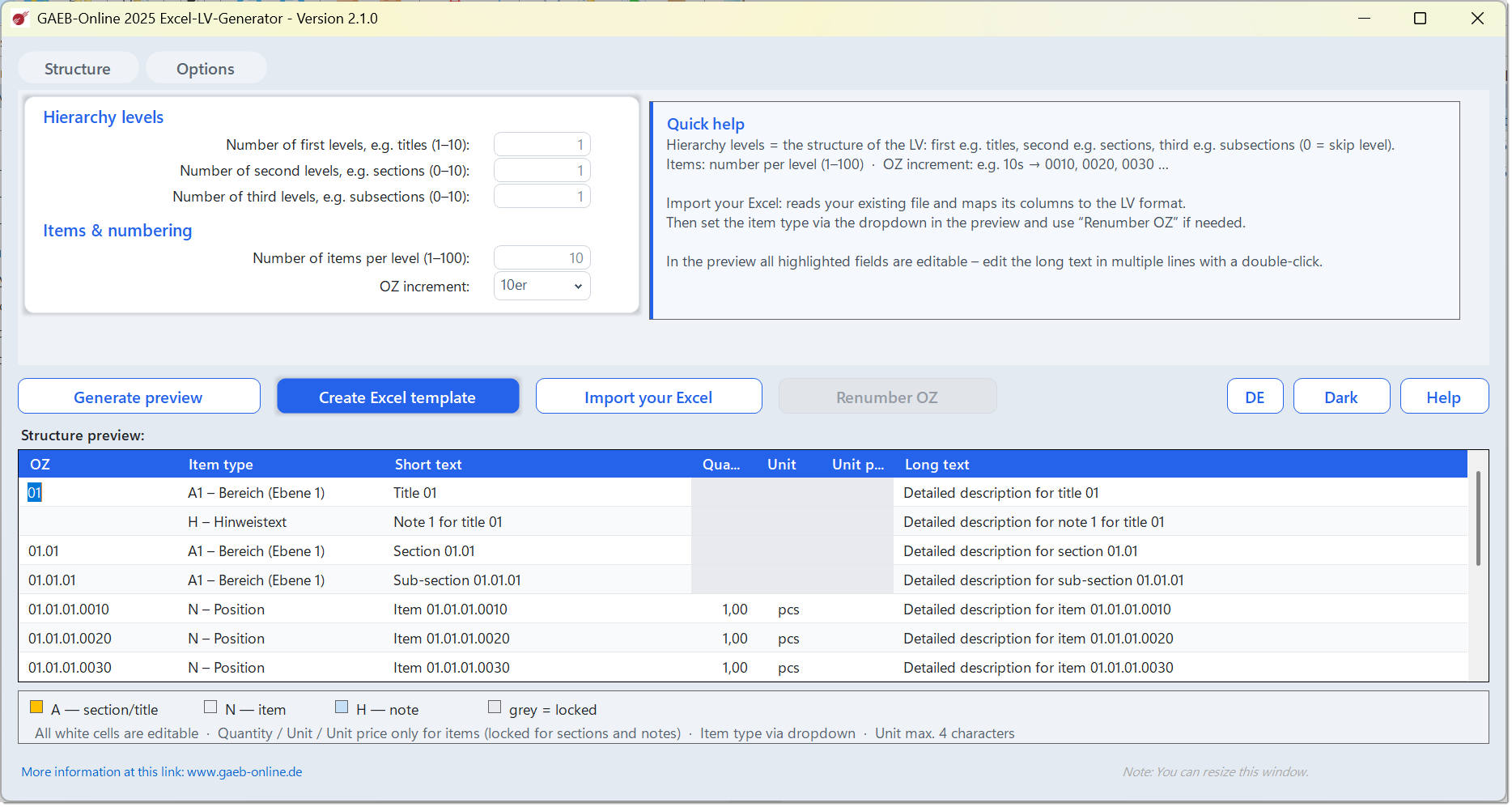
Every Bill of Quantities in GAEB format has a very specific structure. Certain regulations and rules regarding item numbers and hierarchy levels (BoQ groups) must be observed. Especially the somewhat complex structure of the OZ mask – meaning the correct arrangement and order of hierarchies as well as item numbers – poses a challenge for beginners.
Correct Excel template for your Bill of Quantities
The Excel BoQ Generator creates a free Excel template for your Bill of Quantities with one click – logically structured for the import into GAEB-Online 2025, always with the correct OZ mask and OZ structure. In this Excel file you simply enter your descriptions, quantities, and units, and can then easily convert it into a GAEB format via GAEB-Online 2025.
Enter data directly in the preview
Before the Excel file is generated, you can review and complete the entire BoQ structure in an editable preview – including short and long texts, quantities, and units. This saves time later when building the file in Excel.
Import and reshape your own Excel files NEW
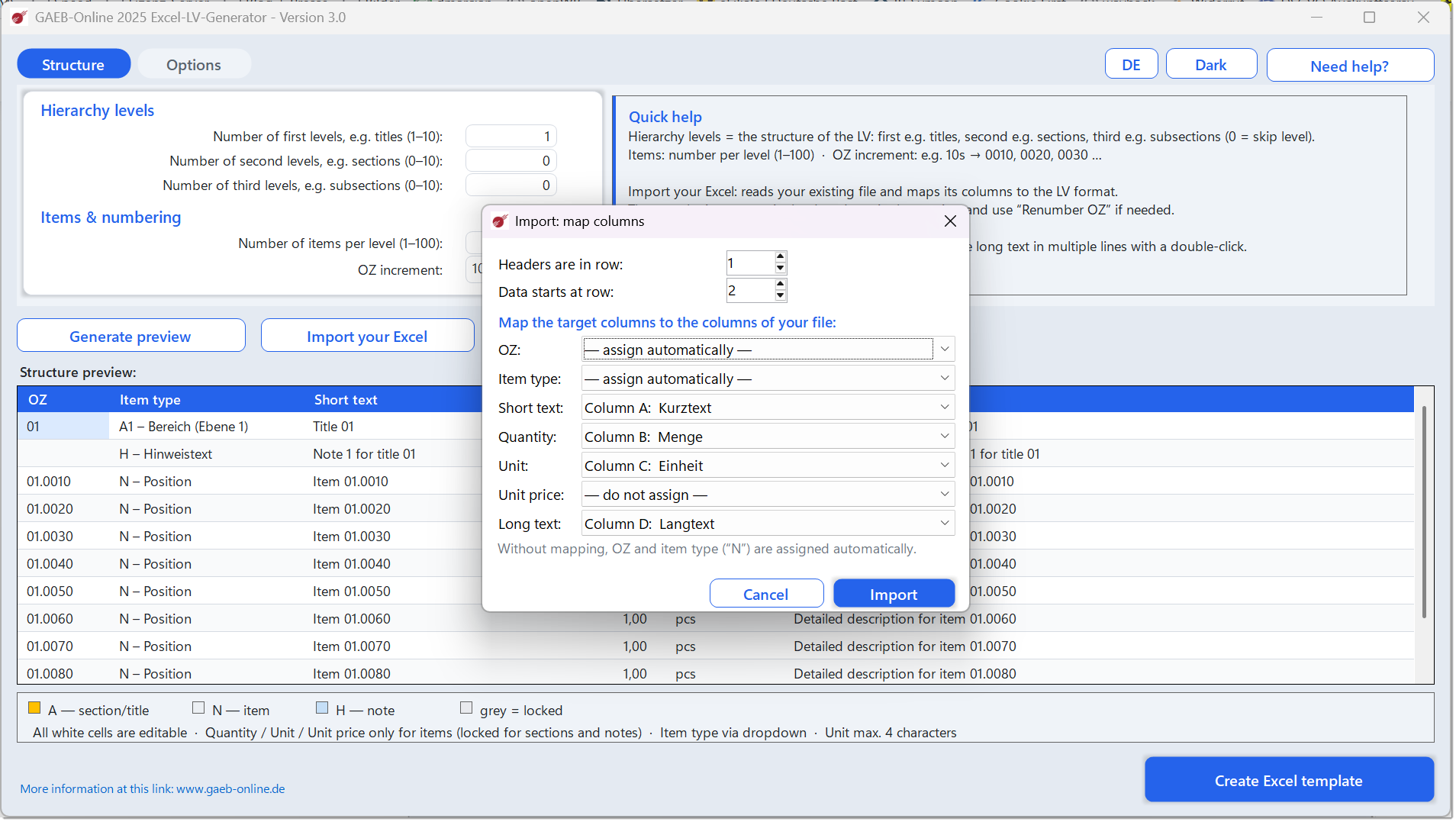
If your Bill of Quantities is already available as an Excel file – but in a different structure – you do not have to re-enter it. With the Import own Excel function, you take over existing tables via column mapping and reshape them into the appropriate import format. Common headings such as „Description“, „Quantity“, or „Price“ are recognized automatically. Item numbers can then be reassigned at the touch of a button.
Convert DATANORM files into an Excel template NEW
With the free Excel BoQ Generator you can also convert DATANORM files in version 4 or 5 into an Excel template – afterwards you import the generated Excel file with GAEB-Online 2025 and create a GAEB-compliant Bill of Quantities from it. Article descriptions are transferred in full into the long text – including article number, EAN, and product group, where present in the DATANORM file.
What is DATANORM? DATANORM is a widely used German standard for the electronic exchange of article and price data between manufacturers, wholesalers, and trade businesses. A typical example: an electrical wholesaler provides an installation company with a DATANORM file. The company imports it into its trade software – after that, all articles including current prices are available for quotations and orders.
The Excel BoQ Generator thus bridges the gap between DATANORM and GAEB: from your wholesaler’s article and price data, a fully structured and GAEB-compliant Excel BoQ is created in just a few steps – ready to be imported directly into GAEB-Online 2025, without manual retyping and without transmission errors.
Pass on to specialist companies & subcontractors
The Excel BoQ Generator is freely copyable and shareable. Do you have the Bill of Quantities prepared by a specialist company, planner, or subcontractor? Simply send them the Excel BoQ Generator (or the ready-made Excel template). Your partner enters their items, short and long texts, quantities, and units conveniently in Excel – entirely without their own GAEB software and without knowledge of the GAEB structure. You receive the filled-in Excel file back, import it into GAEB-Online 2025, and use one click to generate a standard-compliant GAEB BoQ file.
The advantage: your specialist company has to neither buy GAEB software nor know GAEB structures – Excel and a few minutes of training are enough. This way, you speed up coordination, save duplicate work, and avoid transmission errors caused by manual retyping. Fast, easy, and uncomplicated.
By the way: The Excel BoQ Generator does not independently create complete GAEB Bills of Quantities. It provides you with a quick and easy method to generate a suitable Excel template for use with GAEB-Online 2025.
Start the Excel BoQ Generator now € 0 · no registration · no e-mail
Prices
The Excel BoQ Generator is available free of charge. To then convert the Excel file into a GAEB format, the GAEB-Online 2025 software is required.
Frequently Asked Questions (FAQ)
Where can I get a free Excel template for a Bill of Quantities?
You can get a free Excel template for your Bill of Quantities with the Excel BoQ Generator – simply download it for free, start the tool, and generate a correctly structured BoQ template in Excel with a single click. The template contains the correct OZ mask and OZ structure for GAEB-compliant Bills of Quantities. You then enter your items, quantities, and units in Excel and convert the file with GAEB-Online 2025 into the desired GAEB format.
What is the Excel BoQ Generator?
The Excel BoQ Generator is a free tool that creates a correctly structured Excel template for import into GAEB-Online 2025 with one click – with the correct OZ mask and OZ structure. It does not create finished GAEB Bills of Quantities, but rather a suitable Excel template.
Who is the Excel BoQ Generator for?
For construction contractors, architects, engineers, and all specialist companies that want to create their first GAEB Bill of Quantities using Excel and GAEB-Online 2025 – without in-depth knowledge of the GAEB structure.
Is the Excel BoQ Generator really free?
Yes, the Excel BoQ Generator is available for free download. To then convert the Excel file into a GAEB format, the GAEB-Online 2025 software is required (EUR 120 plus VAT).
What is the OZ mask and why is it important?
The OZ mask defines the structure of item numbers (positions) in a GAEB BoQ. The Excel BoQ Generator always creates the template with the correct OZ mask and OZ structure so that the import into GAEB-Online 2025 works smoothly.
What are short and long text in a GAEB BoQ?
The short text is a brief designation of the item (e.g. „Lay screed, 6 cm“), while the long text contains the complete specification description (material, processing, technical requirements). Both are stored separately in the GAEB standard. The Excel BoQ Generator allows direct entry of both fields.
Which Excel version do I need?
The Excel BoQ Generator and the generated template work with Microsoft Excel from version 2016 onwards – Excel 2019 or newer is recommended. Office 365 also works. The generated templates can also be opened and filled in with OpenOffice or LibreOffice.
Does the Excel BoQ Generator work on macOS?
The Excel BoQ Generator itself runs on Windows. You can then also edit the generated Excel template on a Mac with Microsoft Excel or LibreOffice – the import into GAEB-Online 2025 then takes place later on a Windows system.
Do I need an internet connection to use it?
No. The Excel BoQ Generator runs entirely locally on your computer. You only need an internet connection for the one-time download. After that, you can use the tool offline at any time – your data does not leave your computer.
Can I already enter data in the Excel BoQ Generator?
Yes. The Excel BoQ Generator allows direct pre-entry of short and long texts as well as quantities and units in the table. This data is then transferred to Excel, which considerably speeds up data entry in the finished Bill of Quantities.
Can I customize the Excel template?
Yes. You enter your own descriptions, quantities, and units into the generated Excel template and can adapt it to your requirements. You then convert it via GAEB-Online 2025 into a professional GAEB BoQ.
Can I import and reshape existing Excel files?
Yes. With the „Import own Excel“ function, you take over existing Excel BoQs in any structure (.xlsx, .xlsm, .xls). In the mapping dialog you select the appropriate target column for each source column (OZ, item type, short text, quantity, unit, unit price, long text). Common headings such as „Description“, „Quantity“, or „Price“ are recognized automatically. The imported data can be supplemented in the editable preview; item numbers can be renumbered at the touch of a button.
What happens if my Excel file has only one text column?
If short and long text are not in two separate columns, simply assign the existing text column to both target columns (or just the long text). The long text takes over the complete text; the short text is automatically derived from the first line and truncated to a maximum of 70 characters at the next word boundary. In the preview, the derived short texts can then be adjusted line by line.
May I pass the Excel BoQ Generator on to specialist companies or subcontractors?
Yes. The Excel BoQ Generator may be freely copied and passed on. This way, a specialist company or subcontractor can conveniently prepare the Bill of Quantities in Excel – without their own GAEB software and without knowledge of the GAEB structure. You receive the filled-in Excel file back and use GAEB-Online 2025 to generate a standard-compliant GAEB BoQ file from it.
Can I use DATANORM files with the Excel BoQ Generator?
Yes. The Excel BoQ Generator can read DATANORM files in version 4 or 5 and convert them into an Excel template. You then import this Excel template with GAEB-Online 2025 and create a GAEB-compliant Bill of Quantities from it – without manually retyping articles, quantities, or prices.
What is DATANORM and what is it used for?
DATANORM is a widely used German standard for the electronic exchange of article and price data between manufacturers, wholesalers, and trade businesses. Wholesalers provide their trade customers with DATANORM files which are imported into trade software – afterwards, all articles including current prices are available for quotations and orders.
Any questions left?
Just download for free and try it out – no risk, no registration, no e-mail.